

Lead Duplicacy
The Lead Duplicacy settings in Abstract ONE allow you to control how the CRM handles duplicate or re-enquiry leads. You can choose whether to ignore, create a new lead, or merge re-enquiries when the same lead submits again.
From Lead Duplicacy, you can:
- Configure duplicate lead handling behavior
- Prevent loss of lead enquiries due to strict duplicate rules
- Choose the best workflow for your sales team
Access Lead Duplicacy
Go to:
Sidebar → CRM Settings → System Settings → Lead Duplicacy
The Lead Duplicacy Settings page opens.
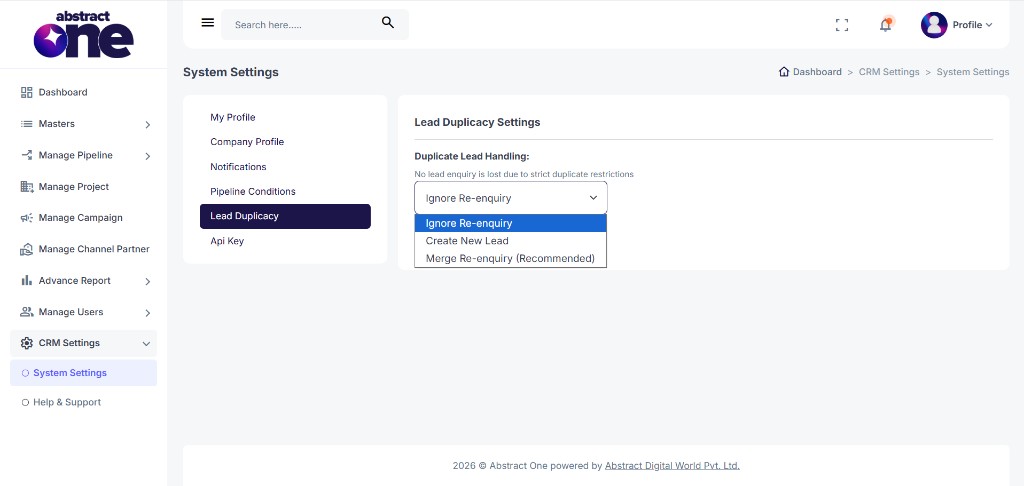
System Settings Menu
Under System Settings, the following options are available:
- My Profile
- Company Profile
- Notifications
- Pipeline Conditions
- Lead Duplicacy
- Api Key
Lead Duplicacy Settings
The page heading shows Lead Duplicacy Settings.
Use the Duplicate Lead Handling dropdown to select how the system should treat duplicate or re-enquiry leads.
Helper text on the page:
No lead enquiry is lost due to strict duplicate restrictions
Duplicate Lead Handling Options
| Option | Description |
|---|---|
| Ignore Re-enquiry | Ignores the duplicate or re-enquiry lead and does not create a new record |
| Create New Lead | Creates a new lead entry even if a duplicate is detected |
| Merge Re-enquiry (Recommended) | Merges the re-enquiry with the existing lead record to keep all activity in one place |
How Each Option Works
Ignore Re-enquiry
When a lead submits again through the same or different source, the system detects the duplicate but does not create a new lead or update the existing record. Use this when you want to strictly avoid duplicate entries.
Create New Lead
When a duplicate is detected, the system still creates a new lead record. Use this when every enquiry should be tracked separately, even from the same contact.
Merge Re-enquiry (Recommended)
When a duplicate is detected, the system merges the re-enquiry into the existing lead. This keeps the lead history, remarks, and follow-ups in a single record. This is the recommended option for most teams.
Important Notes
- Lead duplicacy settings apply at the CRM level for incoming leads.
- Merge Re-enquiry (Recommended) helps maintain a clean pipeline without losing enquiry data.
- Create New Lead may increase duplicate records if the same contact enquires multiple times.
- Ignore Re-enquiry prevents duplicate entries but may hide repeat interest from the same lead.
- Choose the handling option based on how your sales team manages follow-ups and re-enquiries.