

Manage Campaign
The Manage Campaign module allows you to view all campaigns assigned to your account, track lead performance, and filter campaigns by project, interest range, and status.
From Manage Campaign, you can:
- View all campaigns on the Campaign List page
- Search campaigns by name or details
- Filter campaigns by project, interested range, and status
- Monitor lead counts and interest percentage for each campaign
Access Manage Campaign
Go to:
Sidebar → Manage Campaign
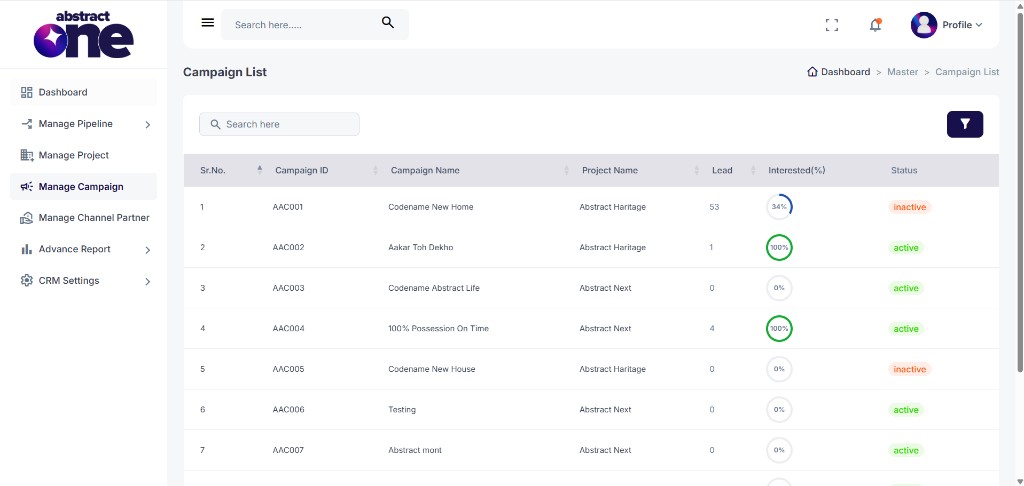
The Campaign List page opens. Breadcrumb: Dashboard → Master → Campaign List.
Campaign Table Columns
The table displays the following columns:
| Column | Description |
|---|---|
| Sr.No. | Serial number of the campaign entry |
| Campaign ID | Unique identifier for the campaign (e.g. AAC001) |
| Campaign Name | Name of the campaign (e.g. Codename New Home, 100% Possession On Time) |
| Project Name | Project associated with the campaign |
| Lead | Total number of leads received from the campaign |
| Interested(%) | Percentage of interested leads, shown with a progress indicator |
| Status | Campaign status — Active or Inactive |
Search Campaigns
Use the search bar above the table to quickly find campaigns by name, campaign ID, or project name.
Filter Campaigns
Click the Filter icon above the table to open the Filter Campaigns drawer.
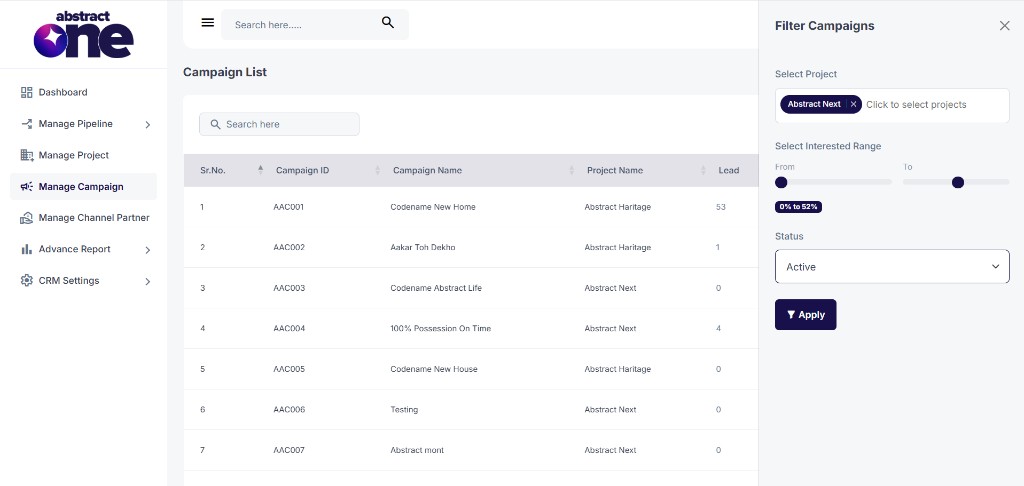
Available filter fields:
| Field | Description |
|---|---|
| Select Project | Filter campaigns by one or more projects |
| Select Interested Range | Filter by interest percentage using From and To sliders |
| Status | Filter by campaign status (Active or Inactive) |
Click Apply to filter the list, or close the drawer to cancel.
Important Notes
- The Campaign List shows only campaigns assigned to your account.
- Lead count and Interested(%) reflect data linked to each campaign in the pipeline.
- Active campaigns are currently running; Inactive campaigns are no longer receiving leads.
- You don’t have access to multiple features in Manage Campaign as they are restricted by the Superadmin. Some actions such as adding, editing, or configuring campaigns may not be visible or available depending on your role and permissions set by the Superadmin.